 ProperHeader
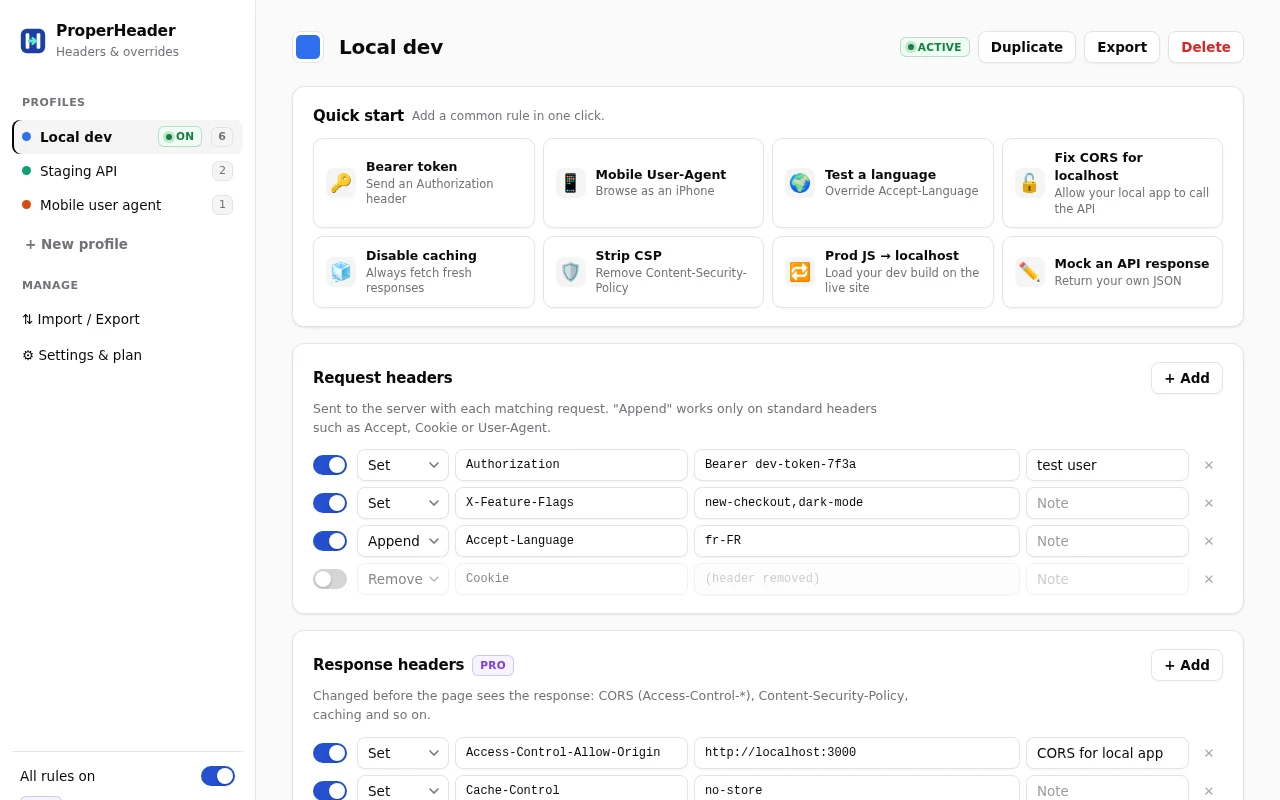
Everything a header extension should do. Nothing it shouldn't.
Fast to set up, easy to switch, precise about which requests it touches.
Request headers
Set, append or remove any header: Authorization tokens, User-Agent, feature flags, debug headers, Accept-Language, cookies.
Response headers PRO
Fix CORS for local development, remove or rewrite Content-Security-Policy, change caching, before the page sees them.
Profiles
Named sets of rules like "Local dev" or "Staging API". Switch with one click from the toolbar; the badge shows what's active.
URL filters PRO
Wildcards, "contains", exact or regex matches, exclusions and resource types, so rules only touch what you mean.
Redirects & blocking PRO
Point production JavaScript at your local dev server, use regex redirects with $1 groups, or block requests outright.
File overrides PRO
Replace a JS, CSS, JSON or HTML response with your own text, the job Resource Override did, rebuilt for Manifest V3. Inject CSS or JS too.
It sees every request. So it's built to be boring to audit.
A header extension can read all of your traffic. That's exactly why you should be able to check what it does with it.
- Nothing leaves your browser. No analytics, no telemetry, no ads, no remote code. On the free plan it makes no network calls at all.
- Code you can read. The package is plain, unminified JavaScript, so you can read every line Chrome runs.
- Locked down by Chrome. The extension's pages can only talk to the licence server, and Chrome enforces that, not a promise.
// Straight from ProperHeader's manifest.json
"content_security_policy": {
  "extension_pages":
    "default-src 'self';
     script-src 'self';
     connect-src https://extensionpay.com;
     object-src 'none'; ..."
},
"optional_host_permissions": ["<all_urls>"]
// no site access until you grant it
Up and running in under a minute.
Create a profile
Start fresh, or import your existing ModHeader profiles and keep working exactly where you left off.
Add your rules
Headers, filters, redirects and overrides, each with its own on/off switch and a note so you remember why.
Flip it from the toolbar
Switch profiles or pause everything in one click. The badge always tells you what's active.
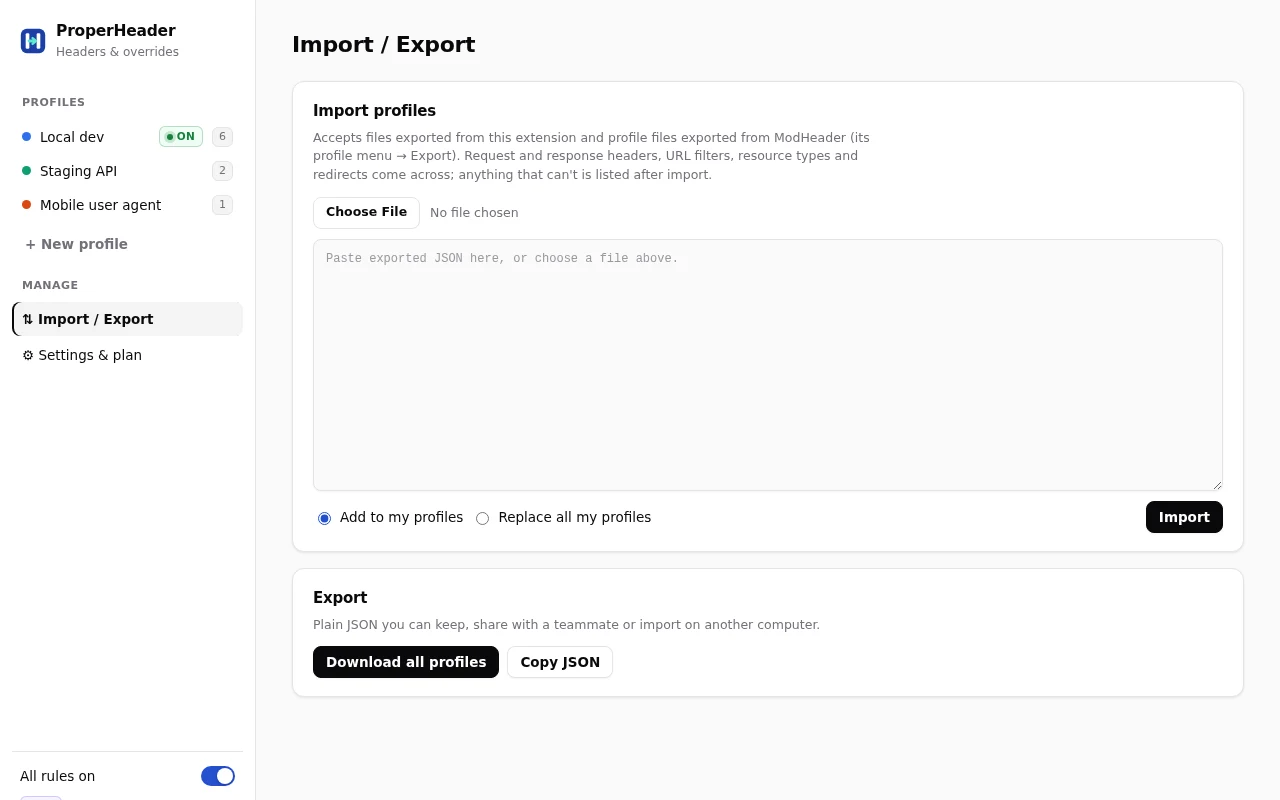
Coming from ModHeader? Bring everything.
Export your profiles from ModHeader, or use a JSON file you saved earlier, then choose Settings → Import / Export → Import.
- Request and response headers, URL filters, resource types and redirects convert automatically.
- Disabled headers stay disabled.
- Anything that can't be converted is listed after import, so nothing disappears silently.
ProperHeader is an independent project and isn't affiliated with ModHeader.
Simple pricing. No surprises.
Start free. Upgrade when you need response headers, filters, redirects and overrides.
Free
For quick header tweaks on a single setup.
- 1 profile
- Unlimited request headers
- Import, export and ModHeader import
- Pause switch and toolbar badge
- No network calls at all
Pro monthly
Every feature, cancel any time.
- Everything in Free, plus:
- Unlimited profiles
- Response headers (CORS, CSP, caching)
- URL filters, regex and exclusions
- Redirects and request blocking
- JS, CSS, JSON and HTML file overrides
- CSS and JavaScript injection
Pro lifetime
Pay once, own it. The price of a year, kept forever.
- Everything in Pro monthly
- Unlimited profiles, response headers, filters, redirects and overrides
- No subscription to manage or forget
- Pays for itself after 12 months
Payments are handled by ExtensionPay with Stripe. The extension never sees your card details.
A header editor you don't have to second-guess.
ProperHeader is going through Chrome Web Store review. Leave your email and you'll get one message when it's live. Nothing else.
Good to know before you install.
Why does a file override sometimes not apply?
Overrides work by redirecting the file to a data: URL. If a site's Content-Security-Policy forbids that, Chrome refuses it. Tick "Remove CSP on" for that site and it works while your profile is on.
Is there a size limit?
Each overridden file can be up to about 1.4 MB, and an overridden response is always HTTP 200 with only a Content-Type header.
Why do I need "Allow User Scripts" for JavaScript injection?
Chrome requires it for any extension that runs your own JavaScript. Switch it on once in chrome://extensions → ProperHeader → Details. CSS injection needs no extra step.
Can it change requests served by a site's service worker?
No. Requests answered from a service-worker cache never reach the network, so no extension can change them.
Stuck? Ask a real person.
Bugs, billing, refunds or a feature you'd like to see. Messages come straight to the developer, and you'll get a reply by email.